How to Build a Nether Portal in Minecraft Complete Step-by-Step Guide 2026
The first portal I ever built worked fine. The second one was supposed to link back to my base, but it dropped me a hundred blocks from where I expected.
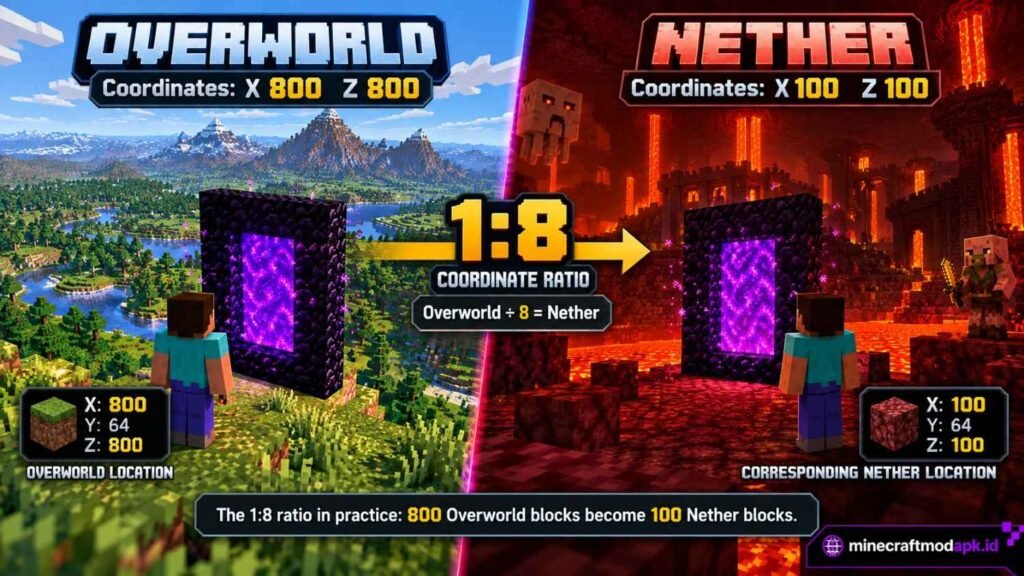
That wasn’t a bug. It’s how the game links portals using the 1:8 coordinate ratio between the Overworld and the Nether, and almost everyone gets caught by it the first time they build a second portal on purpose.
The good news is that How to Build a Nether Portal in Minecraft is easy. Most of the trouble comes from everything around it: getting lost on your first trip, losing your way home or linking portals by guesswork. This guide covers all of it in the order you’ll need it.
On this page: TL;DR · What Is a Nether Portal? · What You Need · How to Get Obsidian · Where to Build · Building the Frame · Lighting the Portal · Entering the Nether · Nether Coordinates · Troubleshooting · Beginner Mistakes · What to Bring · Size Variations · Java vs Bedrock · FAQ · Final Checklist
TL;DR: Quick Answer
- Obsidian needed: 10 blocks minimum, 14 for a full frame with corners
- Tool required: Flint and Steel (1 iron ingot + 1 flint)
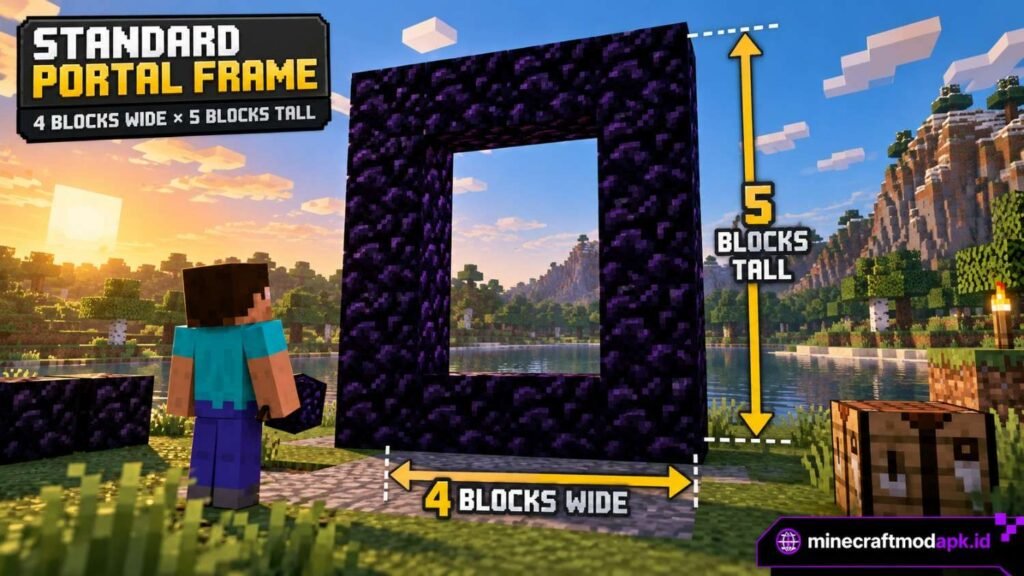
- Frame size: 4 blocks wide × 5 blocks tall (2×3 opening)
- 3 steps: Get obsidian → build a standing frame → light the inside
If you just need a reminder, that’s it. If this is your first portal, keep reading. The details below will save you from the usual mistakes.
What Is a Nether Portal?
A Nether portal is an obsidian doorway between two dimensions: the Overworld, where you start the game, and the Nether, a dangerous underground world full of lava, fire and hostile mobs.
Step into a lit portal and it takes you to the other side. Walk back through and you’re home.
So why go at all? The Nether has things the Overworld doesn’t: blaze rods (needed to reach the End), Nether quartz, ancient debris for netherite gear and piglins you can trade gold with.
It’s also a shortcut. Distances in the Nether are 8 times shorter, so a pair of linked portals can turn a long trek into a short walk. More on that later, since that’s where most portal confusion starts.
First, though, you need the materials.
What You Need to Build a Nether Portal
The shopping list is short: obsidian for the frame and something to light it with.
Materials List
- Obsidian: 10 blocks (minimum) or 14 blocks (full frame with corners)
- Flint and Steel: used to light the portal
- Fire Charge (optional): another way to light it, useful when a dispenser lights the portal as part of a redstone build
How to Craft Flint and Steel
Put 1 iron ingot and 1 flint in a crafting grid. The recipe is shapeless, so their positions don’t matter.
Breaking gravel sometimes drops flint, so keep digging until one shows up. Iron ingots come from smelting raw iron in a furnace.
While you’re at it, make two. You’ll see why when we get to the Nether.
Flint and Steel is the easy part. Obsidian takes a little more work.
How to Get Obsidian (3 Methods)
Obsidian is the one material you can’t substitute, and it’s usually what holds new players back. The right method depends mostly on whether you have a diamond pickaxe yet.
Method 1: Mine It With a Diamond or Netherite Pickaxe
Only a diamond or netherite pickaxe drops obsidian when you mine it. With a weaker tool the block takes a very long time to break and drops nothing, which is a frustrating way to learn that rule.
Obsidian forms naturally where water meets a lava source block, so look near lava lakes, ravines and deep caves.
Without enchantments, each block takes about 9.4 seconds with a diamond pickaxe and a little less with netherite. Efficiency enchantments speed that up a lot.
Method 2: Complete a Ruined Portal
Ruined portals are broken portal frames that generate naturally in the Overworld and the Nether. They often come with a loot chest, so they’re worth checking out even if you don’t need the portal.
Most are missing a few obsidian blocks, and some use crying obsidian. It looks almost the same but has purple drips, and it won’t work in a frame. Swap any crying obsidian for regular obsidian, fill the gaps and the portal lights like any other.
Method 3: The Lava and Water Cast (No Diamond Pickaxe)
No diamonds yet? You can still build a portal. Instead of mining obsidian, you create it right where the frame goes.
- Build a temporary mold from dirt or cobblestone in the shape of your frame. It holds the lava in place.
- Pour a lava bucket into one frame gap.
- Pour water so it flows over the lava source. The lava turns into obsidian.
- Pick the water back up and repeat for each gap.
- Break away the mold and the obsidian frame is left standing.
Work one gap at a time. It’s slower, but it’s much harder to make a mess. Keep wood and other flammable blocks well away while you’re handling lava.
How to Get a Lava Bucket
This method only works if you can carry lava, so here’s how to get it.
Craft a bucket first. Place 3 iron ingots in a V shape in the crafting table: one in each bottom corner and one in the bottom middle.
Find lava. Look for lava lakes on the surface, in caves and ravines, and deep underground near the bottom of the world, where there’s plenty of it. The orange glow gives it away, even through gaps in cave walls.
Collect a source block. Use an empty bucket on still lava. If nothing happens, you’ve clicked on flowing lava. Follow the flow back to where it starts and try again.
Why source blocks matter: Only a lava source turns into obsidian when water hits it. Flowing lava turns into cobblestone, which is the most common reason a cast “doesn’t work.”
How many buckets? You need 10 lava pours in total. Bring 2–4 buckets plus 1 water bucket so you’re not running back and forth for every block.
| Method | What You Need | Best For |
| Mining | Diamond or netherite pickaxe | Mid to late game |
| Ruined portal | A few spare obsidian blocks | Early game, if you find one |
| Lava + water cast | Lava buckets, water bucket | Early game, no diamonds |
Once you have your obsidian, don’t build right where you’re standing. Take a minute to choose the spot.
Where Should You Build Your Nether Portal?
This step is easy to skip, and skipping it is how people end up with burned houses and mobs next to their base.
- Pick a flat, open area. Leave at least 2–3 blocks of free space on every side so you can walk in and out without getting stuck.
- Keep it away from wooden builds. Fire and lava can spread to nearby flammable blocks, and your house is one of them.
- Don’t build it inside your main base. In Java Edition, zombified piglins can sometimes spawn from active portals in the Overworld.
- Plan a small shelter around it. A simple cobblestone room with a door keeps mobs out and protects the portal.
- Planning a second portal? Work out the coordinates first. It takes a minute and saves a lot of wandering. The coordinates section explains how.
With a spot chosen, you’re ready to build.
How to Build a Nether Portal in Minecraft (Step by Step)
The frame is simple once you know the rules. Almost every portal that “won’t light” has a problem with its shape, so check this part carefully.
Frame Size Rules
- The opening must be at least 2 blocks wide and 3 blocks tall
- That makes the smallest frame 4 blocks wide by 5 blocks tall
- The frame must stand upright. Unlike an End portal, a Nether portal can’t lie flat on the ground.
Step-by-Step Placement (10-Block Method)
The four corners are optional, so you can build a working portal with just 10 obsidian. That helps when every block cost you a lava cast or a slow mine.
- Bottom (2 blocks): Place 2 obsidian side by side on the ground.
- Left side (3 blocks): Move one block to the left of the base and stack 3 obsidian upward.
- Right side (3 blocks): Do the same one block to the right of the base.
- Top (2 blocks): Place 2 obsidian across the top, directly above the base.
- Keep the inside clear: The 2×3 opening must be completely empty. Not even a torch or a tuft of grass.
That’s 2 + 3 + 3 + 2 = 10 blocks.
This is where beginners often hesitate. The side pillars don’t touch the base at the corners, which looks wrong. It’s fine, because the game doesn’t check the corners at all.
Here’s how it looks from the front (O = obsidian, · = empty, X = optional corner):
X O O X
O · · O
O · · O
O · · O
X O O X
Do You Need the Corner Blocks?
No. You can leave them empty or fill them with any block. Obsidian in all four corners gives you the classic 14-block frame, but that’s purely for looks.
Tip: If the pillars have nothing underneath them while you build, place a temporary dirt block under each one and remove it once the frame is done.
How to Light Your Nether Portal
This is the most satisfying part. One click and the frame comes to life.
Using Flint and Steel
Hold the Flint and Steel and use it on the inside face of any frame block. The bottom blocks are the easiest to aim at.
If the frame is correct, a purple swirl fills the whole opening straight away. If you only see a small flame, something’s wrong with the frame, so jump to the troubleshooting section.
Other Ways to Light a Portal
No Flint and Steel? Any fire inside the frame will do it:
- Fire Charge: Use it by hand, or have a dispenser fire it into the frame.
- Fire spread: Put a flammable block next to the frame and let fire from nearby lava spread into the opening.
- Lightning: A lightning strike inside the frame will light it.
- Ghast fireball: Mostly an accident, but it counts.
Before you walk through, check your inventory against the packing list further down. You’ll want those items the moment you arrive.
What Happens After You Enter the Nether?
Walk into the purple swirl and stand still. The screen warps for a few seconds, then a loading screen appears while the Nether generates. That’s normal, so don’t step back out.
You’ll arrive standing in a portal. If there’s no portal nearby on the Nether side, the game builds one for you. That portal is your only way home, so treat it that way from the first second.
Your First 2 Minutes in the Nether
These first couple of minutes decide how the trip goes, so don’t rush them.
- Stay put and look around. Check for lava, cliffs, ghasts and piglins before taking a step. Where you arrive is random, and it isn’t always safe.
- Write down the coordinates. Press F3 (Java) or check the on-screen coordinates (Bedrock) and note your portal’s position. If you remember only one step, make it this one.
- Build a safe area. Put down a cobblestone floor and a few walls around the portal. Ghast fireballs can’t easily break cobblestone, so this protects your way home.
- Mark your path. Place torches or a trail of blocks as you explore. The Nether looks the same in every direction, and it’s surprisingly easy to lose your bearings.
- Don’t go far on your first trip. Look around nearby, collect a few resources and head back while you still have supplies.
If a ghast attacks your portal: Step back behind your cobblestone walls, deal with the ghast if you can, then relight the portal with your spare Flint and Steel. This is exactly why you packed two.
Once you’ve made it there and back, the next thing most players want is a second portal. That’s where the coordinates come in.
Where You’ll Land: Nether Coordinates Explained
This is the part that confuses almost every new player, and it’s what caught me out on my second portal. It’s simpler than it looks.
The 1:8 Ratio
- Overworld → Nether: divide X and Z by 8
- Nether → Overworld: multiply X and Z by 8
- Y (height) does not change
So a portal at Overworld X: 800, Z: 800 leads to around Nether X: 100, Z: 100. Walking 100 blocks in the Nether covers what would be an 800-block trip in the Overworld, which is why the Nether makes such a good travel network.
How Portal Linking Actually Works
When you go through a Nether portal mechanics the game works out your matching coordinates in the other dimension. Then it looks for an existing portal nearby.
In Java Edition, it searches within about 128 blocks in the Overworld and 16 blocks in the Nether. If it finds a portal, it links to the closest one. If not, it builds a new one.
That’s exactly what happened with my second portal. An older portal was within that 128-block search area, so the game sent me there instead of the spot I’d planned. Nothing was broken. I just hadn’t done the math.
Worked Example: Linking Two Portals on Purpose
- Check your base coordinates. Say your base is at X: 1200, Y: 70, Z: –640.
- Divide X and Z by 8. That gives X: 150, Z: –80. Leave Y alone.
- Travel to those coordinates in the Nether and build your portal there, as close to Y: 70 as you can.
- Light it and test it. Going back through should now bring you out at your base.
If it doesn’t, the cause is almost always an old portal nearby. The next section covers that.
Nether Portal Not Working? Common Problems and Fixes
Most portal problems come down to a few causes, and each one is quick to fix.
The Portal Won’t Light
- Opening too small: It must be at least 2×3 inside.
- Something inside the frame: Remove grass, torches, snow or any other block.
- Crying obsidian in the frame: Replace it with regular obsidian.
- You’re in the End: Nether portals can’t be activated there.
The Portal Links to the Wrong Place
An older portal is probably inside the search range. Build your new portal at the exact converted coordinates, or break the old portal so it can’t take over the link.
The Portal Suddenly Went Out
Explosions, including ghast fireballs, can knock out an active portal. The frame stays intact, so just relight it with Flint and Steel.
Common Beginner Mistakes
Most bad first trips have nothing to do with the build. They come from small things that are easy to overlook:
- Forgetting Flint and Steel. If a ghast knocks out your portal and you can’t relight it, you’re stuck.
- Using crying obsidian. It looks close enough to fool you, but it won’t work in a frame.
- Getting lost. Without coordinates or a marked trail, finding your portal again can take a long time.
- Leaving the portal unprotected. One ghast blast near an open portal can cut off your way home.
- Going in without blocks or food. You need blocks to bridge gaps and build cover, and food to recover health.
- Sleeping in a bed. Beds explode in the Nether. Don’t try it.
- Building a second portal without planning. Do the coordinate math first, or you’ll end up where I did: a hundred blocks from home.
Packing properly before you go prevents almost all of these.
What to Bring Into the Nether
Run through this list before every trip, not just the first. Each item earns its place:
- ☐ Food: at least one stack of something filling, like cooked meat or bread, to recover health
- ☐ Building blocks: a stack or two of cobblestone for bridges, shelter and blocking off danger
- ☐ Spare Flint and Steel: your backup way home
- ☐ Weapon: a sword, plus a bow if you have one (ghasts stay out of sword range)
- ☐ Pickaxe: iron or better
- ☐ Armor: the best you can make
- ☐ One piece of gold armor: so piglins don’t attack you on sight
- ☐ Fire Resistance potion if you have one
- ☐ Torches: to mark your path back
Nether Portal Size and Design Variations
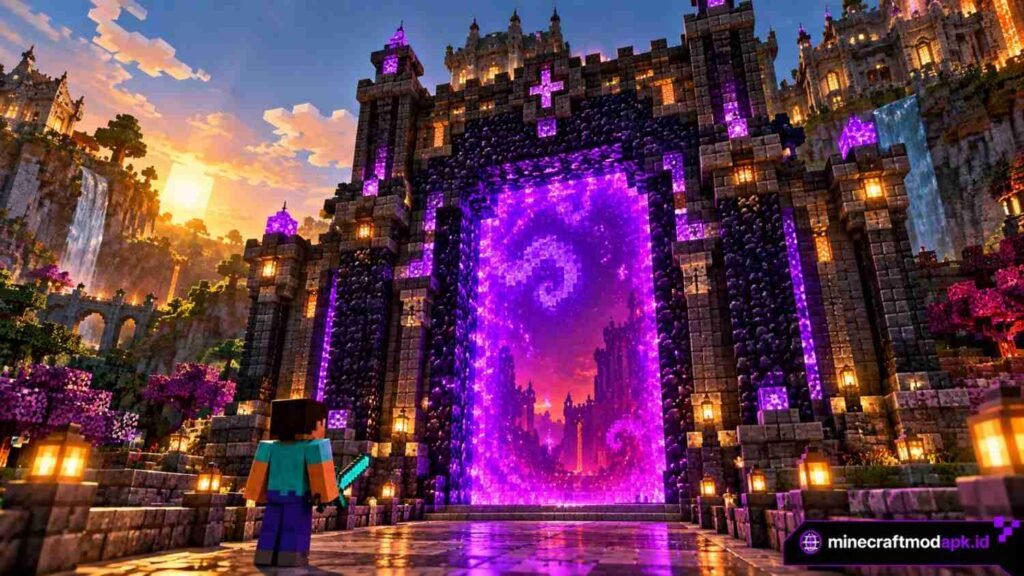
Once the basics are working, you can have some fun with the design. The 4×5 frame is the standard beginner build, but portals can be much bigger. The largest allowed frame is 23×23, which gives a 21×21 opening.
You can also add extra obsidian or decorative blocks around the frame. As long as the opening is a clean rectangle, the portal works exactly the same.
Java vs Bedrock: Key Differences
The build is the same in both editions, but a few details differ. The Nether search range matters most if you play Bedrock and plan to link portals.
| Feature | Java Edition | Bedrock Edition |
| Showing coordinates | Press F3 | “Show Coordinates” in world settings |
| Portal search range (Overworld) | ~128 blocks | ~128 blocks |
| Portal search range (Nether) | ~16 blocks | ~128 blocks |
| Zombified piglin spawns | On the portal frame | Next to the portal |
Frequently Asked Questions
How much obsidian do I need for a Nether portal?
At least 10 obsidian blocks for a working 4×5 portal without corners, or 14 for a complete frame with all four corners.
Can I build a Nether portal without a diamond pickaxe?
Yes. Use the lava and water cast method, or finish a ruined portal you find in the world.
Can I light a Nether portal without Flint and Steel?
Yes. A fire charge, fire spreading from lava, a lightning strike or a ghast fireball inside the frame will all light it.
Why did my Nether portal link to the wrong place?
The game links to the nearest existing portal within its search range. Build your new portal at the correct converted coordinates (X and Z divided by 8) so it becomes the closest match.
Can I build a horizontal Nether portal?
No. Nether portals must stand upright. Only End portals lie flat.
Can mobs travel through Nether portals?
Yes, most mobs can, including hostile ones. A shelter around your portal helps keep unwanted visitors out.
Can I build a Nether portal inside the Nether?
Yes. A portal built in the Nether takes you back to the Overworld, and that’s how you link portals on purpose.
Final Thoughts
Building the portal is the easy part: collect obsidian, stand it up as a frame and light it.
Beginners usually struggle with everything around it: arriving somewhere dangerous, losing the portal home or linking a second portal by guesswork. Write down your coordinates, protect your portal and do the ÷8 math before you build, and you’ll avoid nearly all of it.
Going further: once your portal is lit, learn how every portal type works in our complete guide to making portals in Minecraft.


One Comment