Minecraft Mods A Complete, Updated Guide
Which mod loader should you use in 2026, and does your old modding guide still apply? A lot changed this year: Mojang switched to year-based version numbers, the required Java version jumped, and the usual performance setup moved from OptiFine to Sodium and Iris. This guide is a reset: which loader to pick right now, which mods are worth installing, and how to set everything up on PC and Android without wrecking your world.
Checked against OptiFine’s official downloads page and Modrinth mod listings as of September 2026. Mod compatibility changes frequently, so always confirm the exact Minecraft Mods version and loader on each project’s page.
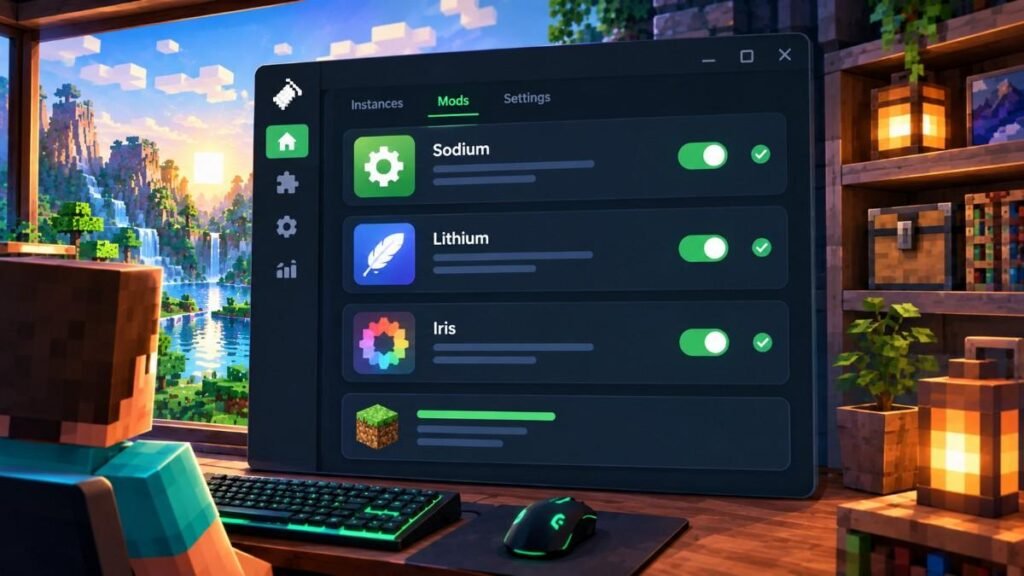
What Changed in 2026: Versions, Java, and Loaders
If you haven’t touched Minecraft mods in a year or two, read this part first. Three things changed.
Version numbers. Java Edition moved to year-based versions. Minecraft 26.1 (“Tiny Takeover”) launched on March 24, 2026, and the current release line is 26.x. Mods are built for specific versions, so a mod made for 1.21.11 will not load on 26.1, and vice versa. Always match the mod’s supported version to the one you play.
Java. Minecraft 26.1 and newer requires Java 25. The official launcher bundles the right runtime, but if you run a server, a loader installer, or a third-party launcher setup yourself, make sure you have Java 25.
Loaders. Mods need a loader, and a mod built for one loader will not run on another unless the project supports both or a compatibility layer is used.
| Loader | Best for | Sodium / Iris | Notes |
| Fabric | Performance mods, lightweight setups | Yes, on supported versions | A common choice for performance-focused setups |
| NeoForge | Large content and tech mods on newer versions | Yes, on supported versions | Check each mod page for version support |
| Forge | Older modpacks | Use Embeddium and Oculus instead | Many established packs still sit on 1.20.1 |
Short version: Fabric for a lightweight performance setup, NeoForge for content-heavy modpacks on current versions, Forge only if a pack you want was never moved off it.
OptiFine in 2026: Where It Actually Stands
Older guides often list OptiFine as the first Minecraft mods to install. Per OptiFine’s official downloads page, its last stable release is for Minecraft 1.21.11 (HD U J9, February 2026). For 26.1.2 and 26.2 only preview builds are listed, with no Forge support, and nothing was listed for 26.3 at the time of writing. That does not mean OptiFine is discontinued, only that support for new game versions can lag behind.
Many players use Iris instead: a shader loader that runs the same OptiFine-style shader packs (BSL, Complementary, Sildur’s) alongside Sodium. Both publish Fabric and NeoForge builds. On Forge, Embeddium (Sodium’s fork) and Oculus (the Iris equivalent) fill the same roles, though shader compatibility can lag a version behind. Not sure which shader packs need a loader at all? See which PBR packs actually need a shader loader.
Frequently Asked Questions
Is OptiFine still worth installing in 2026? Only if you are on 1.21.11 or older and want its extra settings. On current 26.x versions it has previews only, so Sodium plus Iris is the more practical route.
What’s the difference between Forge and NeoForge? NeoForge began as a community fork of Forge. Many newer content mods target NeoForge or Fabric, while Forge remains widely used by established older modpacks. Check a mod’s supported loaders and versions before choosing.
What Java version do I need? Java 25 for Minecraft Mods 26.1 and newer. The official launcher includes it; you only need to install it yourself for servers, manual installers, or some third-party setups.
Do I need to root my Android device to install addons? No. Addons install through Minecraft Mods itself or a file manager like ZArchiver, no root required.
Can I play multiplayer with mods installed? Mods that add blocks, items, or mobs generally need to match on the server and every player. Client-side mods like Sodium and Iris usually work on any server, though some servers restrict them, so check the rules.
Which mod should I install first? It depends on your goal. For a performance-focused Fabric or NeoForge setup, Sodium is a common starting point, provided a build exists for your Minecraft Mods version.
Is Distant Horizons stable enough for regular use? It is very popular, but it has no stable release channel. Every published version is beta or alpha, so expect occasional bugs and match the build to your exact Minecraft version and loader.
Do I need Fabric API? Most Fabric mods list it as a dependency. If the game crashes on launch after adding Fabric mods, a missing or incompatible Fabric API is one of the first things to check.
Can I run Fabric mods on NeoForge? A compatibility layer called Sinytra Connector exists for this, but it does not guarantee every Fabric mod will work. Check its supported versions and each mod’s project page before relying on it.
Best Performance Mods
Performance mods can improve rendering speed, reduce memory use, or optimize game logic. Results depend on your hardware, settings, Minecraft version, and the other mods installed.
| Mod | What it does | Loaders | Note |
| Sodium | Rewrites the rendering engine | Fabric, NeoForge | Common starting point |
| Lithium | Optimizes game logic: mob AI, block ticking, pathfinding | Fabric, NeoForge | Works on client and server |
| FerriteCore | Reduces RAM usage | Fabric, NeoForge | Helps most with large modpacks |
| Iris | Runs shader packs | Fabric, NeoForge | Needs Sodium |
| Distant Horizons | Simplified terrain far beyond render distance | Fabric, NeoForge | Beta only, no stable release |
Loader support above reflects Modrinth listings around late September 2026 for currently supported Fabric and NeoForge versions. Check each project page for your exact Minecraft release, since older versions may not be covered.
Sodium can noticeably improve frame rate, though gains vary widely with your hardware, settings, and the scene being rendered. Lithium handles game logic instead of graphics, so it complements Sodium rather than overlapping with it. FerriteCore cleans up duplicate block-state data, which you notice most with many mods loaded or on a modest machine. Iris enables shader packs for lighting, shadows, reflections, and water effects, but shaders also raise GPU load, so lower settings may be needed on weaker systems.
Distant Horizons fills the grey void at the edge of your render distance with simplified far-away terrain, so distant mountains and coastlines stay visible. It ships Fabric and NeoForge support in one file, but every published version is beta or alpha. Shader support depends on your Iris version, the shader pack, and its settings, and not every pack is built to work with Distant Horizons, so check the pack’s notes. The 26.2 build added Vulkan support for 26.2 and newer. Version matching is exact: a build made for one Minecraft Mods version will not load on another.
If you are on Forge, use Embeddium and Oculus in place of Sodium and Iris. Pairing them with Distant Horizons is possible, but expect some fiddling, and check that the versions of all three line up before assuming your whole setup is broken.
Also worth knowing: Entity Culling skips rendering entities you cannot see (handy in chest-heavy bases), ImmediatelyFast is a lightweight companion to Sodium, and ModernFix helps most on NeoForge and Forge packs.
Install mods gradually and test the game after each addition. That makes it much easier to find which change caused a crash or a performance drop.
Best Content and Gameplay Mods
Content mods change how you explore, build, craft, and manage your world. Availability differs by Minecraft Mods version and loader.
- Cobblemon: a Pokémon-inspired mod with hundreds of catchable creatures using blocky 3D models that fit Minecraft’s look.
- Create: an engineering mod built around mechanical contraptions, rotational power, and factory-style automation that goes well beyond vanilla redstone.
- Xaero’s Minimap and World Map: a corner minimap plus a full explorable world map with waypoints.
- JEI (Just Enough Items): look up any crafting recipe or item use without tabbing out to a wiki. Especially useful once you install several content mods.
- Applied Energistics 2: digital item storage and automation for late-game bases.
- Twilight Forest: a full boss-filled dimension to explore.
- Terralith: adds over a hundred new Overworld biomes through world generation, no new blocks required. Check its version requirements before creating a new world.
- AppleSkin: shows hunger and saturation values at a glance.
Before adding a content mod to an existing world, check whether it changes world generation or adds new blocks, items, or dimensions. Back up the world first.
Popular Shader Packs
Iris (or Oculus) is the loader; the visual overhaul comes from the shader pack you put on top.
- Complementary Reimagined: a widely used shader pack with presets ranging from Potato to Ultra, so you can tune it to your hardware.
- BSL: a long-running pack known for its lighting, shadows, and atmosphere.
- MakeUp Ultra Fast and Sildur’s Vibrant Lite: built for low-end hardware, good fallbacks if a heavier pack costs too many frames.
- Photon and Bliss: for players with GPU headroom who want the shader to be the point.
Start with a lower preset and raise it gradually. Shader packs go in the shaderpacks folder (open it from Iris’s in-game shader menu), not the general mods folder, which is a common point of confusion for first-time installs. For a look at how shaders pair with real resource packs, see BSL and Complementary shown on real texture packs.
Installing Mods on PC (Java Edition)
Pick your loader based on what you are installing: Fabric for lightweight performance setups, NeoForge for most current content modpacks.
- Download the loader installer from its official site and run it, pointing it at your existing Minecraft Mods installation.
- Launch Minecraft once through the new loader profile so it generates a mods folder, then close the game.
- Download mod files (.jar) from CurseForge or Modrinth, and confirm the Minecraft Mods version, loader, and dependencies on each project’s page.
- Drop the .jar files into the mods folder. Do not extract a .jar unless the project’s own instructions say to.
- Install any required dependencies, such as Fabric API, in a compatible version.
- Relaunch through the same loader profile. If it crashes, read the error message before adding more mods.
If you would rather skip manual setup, launchers such as the Modrinth App, Prism Launcher, and the CurseForge app manage profiles for you and support one-click modpack installs that handle the loader, mods, and configuration together. Keeping a separate profile for each mod collection also protects your main world.
[IMAGE PLACEHOLDER 2: IN-CONTENT IMAGE] File Name: minecraft-mods-folder-jar-files.webp Alt Text: A Windows file explorer window showing the Fabric mods folder with sodium.jar, lithium.jar, and fabric-api.jar Placement: Right after the PC installation steps Caption: Fabric API has to sit alongside the mods that depend on it, or the game crashes on launch.
Installing Addons on Android / Bedrock Edition
These Android instructions are for Minecraft Bedrock Edition addons, not Java .jar mods.
. A Fabric or NeoForge mod from the PC section will not work on Android, even if you copy the file over. Bedrock uses “addons,” which are behavior packs and resource packs, so the process is different.
The easy way
- Download an addon in .mcpack or .mcaddon format from a source you trust.
- Open the file. Minecraft Mods should launch and import it automatically.
- Create or edit a world, open Behavior Packs / Resource Packs, and activate the addon’s packs before loading the world.
The manual way (if a file will not import, or it is a .zip)
- Check the addon’s own instructions first, then extract the .zip with a file manager such as ZArchiver only if they call for it.
- Move the pack folders to Minecraft’s storage location, if your Android version allows access to it.
- Activate the packs in the world settings as above.
Android storage access and folder locations vary by device and Android version. If the usual folder is unavailable, use the addon’s documented import method rather than moving files into unrelated directories.
Some addons require experimental toggles, a particular Minecraft Mods version, or a brand-new world. Adding one to an existing world may not affect content that world already generated the way it would in a new world, so back up important worlds before testing. If an addon does not show up, check its version compatibility before assuming the install failed.
[IMAGE PLACEHOLDER 3: IN-CONTENT IMAGE] File Name: minecraft-bedrock-addon-behavior-pack.webp Alt Text: The Behavior Packs tab in Minecraft Bedrock’s world settings, showing an addon toggled active Placement: Right after the Android steps Caption: Activate an addon’s packs here before loading the world.
Why Your Mods Crash
Check in this order: Minecraft Mods version → loader → dependencies → Java version → companion-mod compatibility.
- Minecraft Mods version. Was the mod built for your exact version? A 1.21.11 mod will not load on 26.1.
- Loader. Is it a Fabric mod in a NeoForge profile, or the reverse?
- Dependencies. Is Fabric API or another required library mod installed?
- Java version. Minecraft Mods 26.1 and newer needs Java 25. Custom launchers and servers may need separate runtime setup.
- Companion mods. Sodium, Iris, and Distant Horizons need builds that line up with each other and with your game version.
- Conflicting mods. Remove recently added mods, launch again, then add them back one at a time.
- Error logs. Read the crash report or launcher log. It often names the missing dependency, unsupported version, or mod involved.
Change one thing at a time. That preserves clues about the original problem, which reinstalling everything at once destroys.
Are Mods Safe?
No platform can guarantee every third-party upload is risk-free. CurseForge and Modrinth are established mod-hosting platforms, but you should still check the project, the author, the download source, and the file type before installing.
- Avoid unfamiliar download sites, suspicious redirects, and repackaged installers.
- Review Android permissions. An addon should not need broad access unrelated to its stated purpose. Prefer established Bedrock addon repositories, and avoid APK or “mod” sites that bundle installers.
- Back up your worlds before installing anything unfamiliar, especially mods that change terrain, dimensions, or saved-world data.
- Remove suspicious files. If a download behaves unexpectedly or asks for unusual access, stop using it and review the source.
Because Minecraft Mods versions and mod support change quickly, older guides can become outdated. Always match your loader, mods, dependencies, and Java version to the Minecraft Mods release you are actually running, and test additions before using them in your main world.
Mods and add-ons change with every game update — see what’s new in the latest Bedrock 26.70.20 preview, and set up an enchanting table to get the most out of modded gear.


2 Comments